Featured image of post 基于 Github Workflow 的多仓库脚本联动

基于 Github Workflow 的多仓库脚本联动

使用 Github Workflow 实现多个仓库之间的 Git 操作、Python 等脚本联动,提升开发效率和自动化水平。

前言

一开始搭建出博客后就基于 Aplayer 制作了大多博客都有的页内音乐播放器,主要功能实现起来简单,但是有两个痛点:1. 音乐资源存储;2. 切换页面断点续播。

在 AI 编程工具日益强大的当前,上个月很快利用 Pjax 等基本实现了第二个音乐续播的问题(副作用是部分页面 JS 失效,可能需要多刷新一次 T_T),而第一个问题在我临时采用另一个仓库存储音乐资源后,就再也没管了。

在这套方案下,每当我需要更新若干首曲目到我的音乐列表时,不仅需要手动上传音乐到音乐资源仓库,还需要手动更新博客仓库中的 Aplayer 配置文件。因此,想要自动化整个流程,实现 push 音乐后,自动更新博客配置并重新部署的想法一直萦绕在我脑海里。

在了解到 CI/CD 的概念,并轻度使用了 Github Workflow 后,今天在 AI 的协助下,终于实现了整个流程。

方案设计

音乐资源仓库(music)和博客仓库(hugo)之间的数据流程如下:

用户提交更新音乐文件到music仓库后,触发 Github Workflow:1. 在music仓库中执行脚本,更新musicList.json文件;2. 将更新后的musicList.json文件提交到博客仓库(hugo)的特定分支;3. 博客仓库(hugo)的 Workflow 监听到该分支的更新后,自动部署博客。
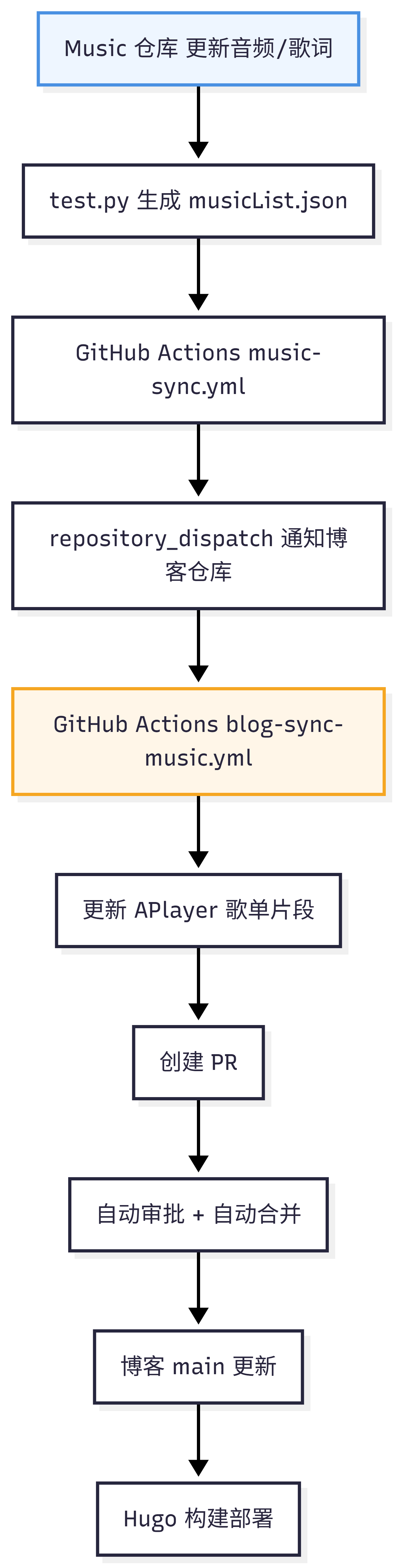
workflow

实现过程

1. music 仓库

1.1 Workflow 配置

.github/workflows/music-sync.yml 中配置 Workflow:

  • 触发条件:监听 main 分支的 push 事件,且仅当特定路径(如 musics/**, lrc/**, test.py, .github/workflows/music-sync.yml)发生变化时触发;同时支持手动触发。
  • 操作:
    1. 检出代码并设置 Python 环境。
    2. 执行test.py脚本生成 musicList.json
    3. 检查 musicList.json 是否有变化,如果有则提交更新到 music 仓库。
    4. 如果有更新且存在有效的 dispatch token,则触发 repository dispatch 事件,通知博客仓库进行同步。
 1
 2
 3
 4
 5
 6
 7
 8
 9
10
11
12
13
14
15
16
17
18
19
20
21
22
23
24
25
26
27
28
29
30
31
32
33
34
35
36
37
38
39
40
41
42
43
44
45
46
47
48
49
50
51
52
53
54
55
56
57
58
59
60
61
62
63
64
65
66
67
68
69
70
71
72
73
74
75
76
77
78
79
80
81
82
83
84
85
86
name: Music List Sync

on:
  push:
    branches:
      - main
    paths:
      - "musics/**"
      - "lrc/**"
      - "test.py"
      - ".github/workflows/music-sync.yml"
  workflow_dispatch:

permissions:
  contents: write

concurrency:
  group: music-list-sync
  cancel-in-progress: true

jobs:
  generate-and-dispatch:
    runs-on: ubuntu-latest
    env:
      DISPATCH_TOKEN: ${{ secrets.BLOG_REPO_DISPATCH_TOKEN }}

    steps:
      - name: Checkout
        uses: actions/checkout@v6

      - name: Setup Python
        uses: actions/setup-python@v6
        with:
          python-version: "3.11"

      - name: Generate musicList.json
        env:
          CI: "true"
          SKIP_LRC_GENERATION: "true"
          REQUIRE_LRC: "true"
          DISABLE_BAK: "true"
        run: python test.py

      - name: Check diff
        id: diff
        shell: bash
        run: |
          if git diff --quiet -- musicList.json; then
            echo "changed=false" >> "$GITHUB_OUTPUT"
          else
            echo "changed=true" >> "$GITHUB_OUTPUT"
          fi

      - name: Commit and push musicList.json
        if: steps.diff.outputs.changed == 'true'
        shell: bash
        run: |
          git config user.name "github-actions[bot]"
          git config user.email "41898282+github-actions[bot]@users.noreply.github.com"
          git add musicList.json
          git commit -m "chore: auto update musicList.json"
          git push

      - name: Get current source sha
        if: steps.diff.outputs.changed == 'true'
        id: source_sha
        shell: bash
        run: echo "sha=$(git rev-parse HEAD)" >> "$GITHUB_OUTPUT"

      - name: Dispatch to blog repository
        if: steps.diff.outputs.changed == 'true' && env.DISPATCH_TOKEN != ''
        uses: peter-evans/repository-dispatch@v3
        with:
          token: ${{ env.DISPATCH_TOKEN }}
          repository: lihan3238/lihan3238.github.io
          event-type: music_list_updated
          client-payload: >-
            {
              "source_repo": "${{ github.repository }}",
              "source_sha": "${{ steps.source_sha.outputs.sha }}",
              "json_raw_url": "https://raw.githubusercontent.com/lihan3238/music/main/musicList.json"
            }

      - name: Skip dispatch when token missing
        if: steps.diff.outputs.changed == 'true' && env.DISPATCH_TOKEN == ''
        run: echo "BLOG_REPO_DISPATCH_TOKEN is not set, skip repository_dispatch."

1.2 脚本实现

test.py 脚本主要功能是扫描 musics/ 目录下的音乐文件,生成对应的 musicList.json 文件,并根据需要生成歌词文件(lrc/)。脚本会根据环境变量控制是否跳过歌词生成、是否要求必须有歌词等逻辑。

  1
  2
  3
  4
  5
  6
  7
  8
  9
 10
 11
 12
 13
 14
 15
 16
 17
 18
 19
 20
 21
 22
 23
 24
 25
 26
 27
 28
 29
 30
 31
 32
 33
 34
 35
 36
 37
 38
 39
 40
 41
 42
 43
 44
 45
 46
 47
 48
 49
 50
 51
 52
 53
 54
 55
 56
 57
 58
 59
 60
 61
 62
 63
 64
 65
 66
 67
 68
 69
 70
 71
 72
 73
 74
 75
 76
 77
 78
 79
 80
 81
 82
 83
 84
 85
 86
 87
 88
 89
 90
 91
 92
 93
 94
 95
 96
 97
 98
 99
100
101
102
103
104
105
106
107
108
109
110
111
112
113
114
115
116
117
118
119
120
121
122
123
124
125
126
127
128
129
130
131
132
133
134
135
136
137
138
139
140
141
142
143
144
145
146
147
148
149
150
151
152
153
154
155
156
157
158
159
160
161
162
163
164
165
166
import os
import json
import datetime
import shutil
import subprocess


def env_true(name: str, default: bool = False) -> bool:
    value = os.getenv(name)
    if value is None:
        return default
    return value.strip().lower() in {"1", "true", "yes", "on"}

# 指定目录路径
directory_path = "./musics/"  # 请将路径替换为实际的目录路径
lrc_txt_path = "./lrc/"      # 歌词文本文件目录
bak_path = "./Baks/"         # 备份目录
json_filename = "musicList.json"

is_ci = env_true("CI")
skip_lrc_generation = env_true("SKIP_LRC_GENERATION", default=is_ci)
require_lrc = env_true("REQUIRE_LRC", default=is_ci)
disable_backup = env_true("DISABLE_BAK", default=is_ci)

audio_exts = {".mp3", ".m4a", ".flac", ".wav", ".ogg", ".aac"}

# 构建URL的基本部分
base_url = "https://github.com/lihan3238/music/raw/main/musics/"
base_lrc_url = "https://raw.githubusercontent.com/lihan3238/music/main/musics/"

# 确保lrc目录存在
if not os.path.exists(lrc_txt_path):
    os.makedirs(lrc_txt_path)

# 确保音乐目录存在
if not os.path.exists(directory_path):
    raise FileNotFoundError(f"Music directory not found: {directory_path}")

# 确保备份目录存在(仅在启用备份时)
if not disable_backup and not os.path.exists(bak_path):
    os.makedirs(bak_path)

# 获取目录中的所有文件名
file_names = [
    file
    for file in os.listdir(directory_path)
    if os.path.isfile(os.path.join(directory_path, file))
]
file_names.sort(key=lambda name: name.lower())

# 构建歌词文件映射(key 使用小写,兼容 Linux 大小写敏感文件系统)
lrc_name_map = {
    file_name.lower(): file_name
    for file_name in file_names
    if os.path.splitext(file_name)[1].lower() == ".lrc"
}

music_list = []
missing_lrc_files = []

# 遍历文件名
for file_name in file_names:
    ext = os.path.splitext(file_name)[1].lower()
    if ext not in audio_exts:
        continue

    file_path = os.path.join(directory_path, file_name)
    file_base_name = os.path.splitext(file_name)[0]
    lrc_file_name = file_base_name + ".lrc"
    lrc_file_path = os.path.join(directory_path, lrc_file_name)

    if os.path.exists(lrc_file_path):
        resolved_lrc_file_name = lrc_file_name
    else:
        resolved_lrc_file_name = lrc_name_map.get(lrc_file_name.lower())

    # 检查是否需要生成LRC(CI默认跳过)
    if not resolved_lrc_file_name and not skip_lrc_generation:
        txt_file_path = os.path.join(lrc_txt_path, file_base_name + ".txt")
        print(f"Generating LRC for {file_name}...")
        try:
            # 调用 lrcgen
            # 有歌词文本则使用 --lyrics-file,否则直接生成
            # 使用绝对路径以防万一
            abs_audio = os.path.abspath(file_path)
            abs_lrc = os.path.abspath(lrc_file_path)
            
            if os.path.exists(txt_file_path):
                abs_txt = os.path.abspath(txt_file_path)
                cmd = ["lrcgen", abs_audio, abs_lrc, "--lyrics-file", abs_txt, "--model", "large-v3"]
            else:
                cmd = ["lrcgen", abs_audio, abs_lrc, "--model", "large-v3"]

            subprocess.run(cmd, check=True)
            print(f"Successfully generated {lrc_file_name}")
            resolved_lrc_file_name = lrc_file_name
            lrc_name_map[lrc_file_name.lower()] = lrc_file_name
        except subprocess.CalledProcessError as e:
            print(f"Failed to generate LRC for {file_name}: {e}")
        except FileNotFoundError:
            print("Error: lrcgen command not found. Please ensure lrcgen is installed and in PATH.")

    has_lrc = bool(resolved_lrc_file_name)
    
    if not has_lrc:
        print(f"Warning: missing matching LRC for {file_name} -> expected {lrc_file_name}")
        missing_lrc_files.append(file_name)

    # 构建信息
    lrc_url = base_lrc_url + resolved_lrc_file_name if has_lrc else ""
    
    name_part = file_base_name
    if "-" in name_part:
        parts = name_part.split("-")
        name = parts[0].strip()
        artists = "-".join(parts[1:]).strip()
    else:
        name = name_part
        artists = ""

    url = f"{base_url}{file_name}"

    music_obj = {
        "name": name,
        "url": url,
        "artist": artists,
        "cover": "https://user-images.githubusercontent.com/140466644/266218167-0a08d24b-2f75-4a6b-9253-227612dffa98.png"
    }
    if lrc_url:
        music_obj["lrc"] = lrc_url

    music_list.append(music_obj)


if require_lrc and missing_lrc_files:
    print("\nMissing matching .lrc files for these tracks:")
    for file_name in missing_lrc_files:
        print(f"- {file_name}")
    raise SystemExit(1)


# 写入 JSON 文件
print(f"Updating {json_filename}...")
with open(json_filename, "w", encoding="utf-8") as f:
    json.dump(music_list, f, ensure_ascii=False, indent=4)


# 备份逻辑
if not disable_backup:
    bak_files = [f for f in os.listdir(bak_path) if f.startswith("musicList_") and f.endswith(".json")]
    if len(bak_files) > 5:
        print("备份文件超过6个,正在删除最旧的备份文件...")
        oldest_file = min(
            bak_files, key=lambda x: os.path.getctime(os.path.join(bak_path, x))
        )
        os.remove(os.path.join(bak_path, oldest_file))

    current_date_time = datetime.datetime.now().strftime("%Y%m%d%H%M%S")
    backup_file = f"musicList_{current_date_time}.json"
    if os.path.exists(json_filename):
        shutil.copy(json_filename, os.path.join(bak_path, backup_file))
        print(f"已备份为 {backup_file}")
else:
    print("Backup is disabled by DISABLE_BAK.")

print(f"数据已写入到 {json_filename} 文件中。")

1.3 Github 仓库与权限配置

1.3.1 Github Personal Access Token 配置 - BLOG_REPO_DISPATCH_TOKEN
  • Github PAT 用于授权 Workflow 在 music 仓库中执行 Git 操作(如提交更新)以及触发博客仓库的 dispatch 事件。
  1. 打开 Github 右上角头像,进入 Settings -> Developer settings -> Personal access tokens

  2. 点击 Personal access tokens,然后点击 Fine-grained tokens

  3. 点击 Generate new token,选择 Generate new token (fine-grained)

  4. 配置 Token:

    • Name: BLOG_REPO_DISPATCH_TOKEN
    • Expiration: 根据需要选择(建议设置合理的过期时间)
    • Repository access: 选择 Only select repositories,然后选择 lihan3238/lihan3238.github.io (hugo博客)仓库。
    • Permissions:
      • Repository permissions: Contents 设置为 Read and write
  5. 生成 Token 后,复制 Token 的值。

  6. 进入 music 仓库的 Settings -> Secrets and variables -> Actions,点击 New repository secret

  7. Name: BLOG_REPO_DISPATCH_TOKEN,Value: 粘贴刚才复制的 Token,保存。

2. hugo 仓库

2.1 Workflow 配置

  • 触发条件:监听 repository dispatch 事件(music_list_updated)和手动触发。
  • 操作:
    1. 拉取并更新 layouts/partials/music.html 的歌单
    2. 用 create-pull-request 创建 PR(v8)
    3. 用 BLOG_REPO_AUTOMATION_TOKEN 自动审批
    4. 直接执行 squash merge 并删分支
    5. 最后再发一个 hugo_deploy_requested 的 dispatch 事件,触发部署流程。
 1
 2
 3
 4
 5
 6
 7
 8
 9
10
11
12
13
14
15
16
17
18
19
20
21
22
23
24
25
26
27
28
29
30
31
32
33
34
35
36
37
38
39
40
41
42
43
44
45
46
47
48
49
50
51
52
53
54
55
56
57
58
59
60
61
62
63
64
65
66
67
68
69
70
71
72
73
74
75
76
77
78
79
80
81
82
83
84
85
86
87
88
89
90
name: Sync Music Player List

on:
  repository_dispatch:
    types: [music_list_updated]
  workflow_dispatch:

permissions:
  contents: write
  pull-requests: write

concurrency:
  group: blog-music-sync
  cancel-in-progress: true

jobs:
  sync-music-list:
    runs-on: ubuntu-latest
    env:
      AUTOMATION_TOKEN: ${{ secrets.BLOG_REPO_AUTOMATION_TOKEN }}

    steps:
      - name: Checkout blog repository
        uses: actions/checkout@v6
        with:
          persist-credentials: false
          fetch-depth: 0

      - name: Setup Python
        uses: actions/setup-python@v6
        with:
          python-version: "3.11"

      - name: Download updater script
        shell: bash
        run: |
          mkdir -p scripts
          curl -fsSL \
            https://raw.githubusercontent.com/lihan3238/music/main/integration/blog/update_aplayer_music.py \
            -o scripts/update_aplayer_music.py

      - name: Update player list in partial
        env:
          TARGET_FILE: layouts/partials/music.html
          MUSIC_URL: https://raw.githubusercontent.com/lihan3238/music/main/musicList.json
        run: python scripts/update_aplayer_music.py

      - name: Create pull request
        id: cpr
        uses: peter-evans/create-pull-request@v8
        with:
          # Use GITHUB_TOKEN to create PRs so a separate PAT identity can approve.
          token: ${{ github.token }}
          branch: chore/sync-music-list
          # Always create a fresh PR branch to avoid updating legacy PRs
          # created by a different author identity.
          branch-suffix: short-commit-hash
          base: main
          delete-branch: true
          title: "chore: sync music list from music repository"
          body: |
            Auto-generated by workflow.

            - Event: repository_dispatch (music_list_updated)
            - Source: ${{ github.event.client_payload.source_repo || 'manual' }}
            - SHA: ${{ github.event.client_payload.source_sha || 'manual' }}
          commit-message: "chore: sync music list"
          add-paths: |
            layouts/partials/music.html

      - name: Auto approve pull request
        if: steps.cpr.outputs.pull-request-number != ''
        env:
          GH_TOKEN: ${{ env.AUTOMATION_TOKEN }}
        run: gh pr review "${{ steps.cpr.outputs.pull-request-number }}" --approve --repo "${{ github.repository }}"

      - name: Merge pull request
        if: steps.cpr.outputs.pull-request-number != ''
        env:
          GH_TOKEN: ${{ env.AUTOMATION_TOKEN }}
        run: gh pr merge "${{ steps.cpr.outputs.pull-request-number }}" --squash --delete-branch --repo "${{ github.repository }}"

      - name: Trigger Hugo deployment
        if: steps.cpr.outputs.pull-request-number != ''
        env:
          GH_TOKEN: ${{ env.AUTOMATION_TOKEN }}
        run: |
          gh api \
            repos/${{ github.repository }}/dispatches \
            -f event_type=hugo_deploy_requested

2.2 Github 仓库与权限配置

2.2.1 Github Personal Access Token 配置 - BLOG_REPO_AUTOMATION_TOKEN
  • #1.3.1,选择 lihan3238/lihan3238.github.io 仓库,并且权限需要包含 Pull requests: WriteContents: Write,以便 Workflow 可以自动审批和合并 PR。
2.2.2 仓库权限配置
  • hugo 仓库的 Settings -> Actions -> General 中,确保 Workflow permissions 设置为 Read and write permissions,以允许 Workflow 执行写操作(如提交更改、创建 PR 等)。

总结

Github 的 workflow 功能非常强大,可以实现跨仓库的自动化操作,极大提升了开发效率和自动化水平。通过合理设计 Workflow 的触发条件和操作步骤,我们可以实现复杂的多仓库联动场景,如本次的音乐列表同步和博客部署流程。

由此看到,包括 K8s、github workflow 等 CI/CD 工具在内的现代开发工具链,已经成为提升开发效率和自动化水平的关键组成部分。学习和掌握 CI/CD 十分重要。

潇洒人间一键仙
使用 Hugo 构建
主题 StackJimmy 设计